Auto-collect feedback after every community event
The richest feedback you'll ever collect shows up in the hour after an event ends — and most of it evaporates because the ask goes out late, or not at all. Here's how to wire your event tool to a recording form so every attendee gets a one-tap video link the moment the session wraps.
Why post-event feedback slips away
Right after a session ends, you're the most tired person in the room. You hosted, you moderated the chat, you answered the stragglers' questions. Sending a thoughtful feedback request is the last thing on your mind.
Attendees, meanwhile, are at their peak. The conversation is fresh, the energy is real, and what they'd say on camera right now is specific and warm. By the next morning, that same person will type "great event, thanks!" and move on. Community managers who get the ask out within the first hour tend to see noticeably more replies — and much better ones.
The fix isn't more discipline. It's taking yourself out of the loop entirely, so the ask sends itself while you're still saying goodbyes.
The three pieces you need
This setup works with almost any stack, because it only needs three parts:
- Your event tool. Anything that knows when a session ends — Luma, Zoom, a community platform with built-in events, even a shared calendar. If it can send a follow-up or connect to an automation tool, it qualifies.
- A recording form. In Wovestory, that's a single link. When an attendee taps it on their phone, the camera opens right in the browser — no app, no account, no login.
- A connector. Some event tools can send the follow-up themselves. If yours can't, an automation tool like Zapier or Make bridges the two. Wovestory plugs into 30+ platforms, so odds are your stack is already covered — check the integrations list.
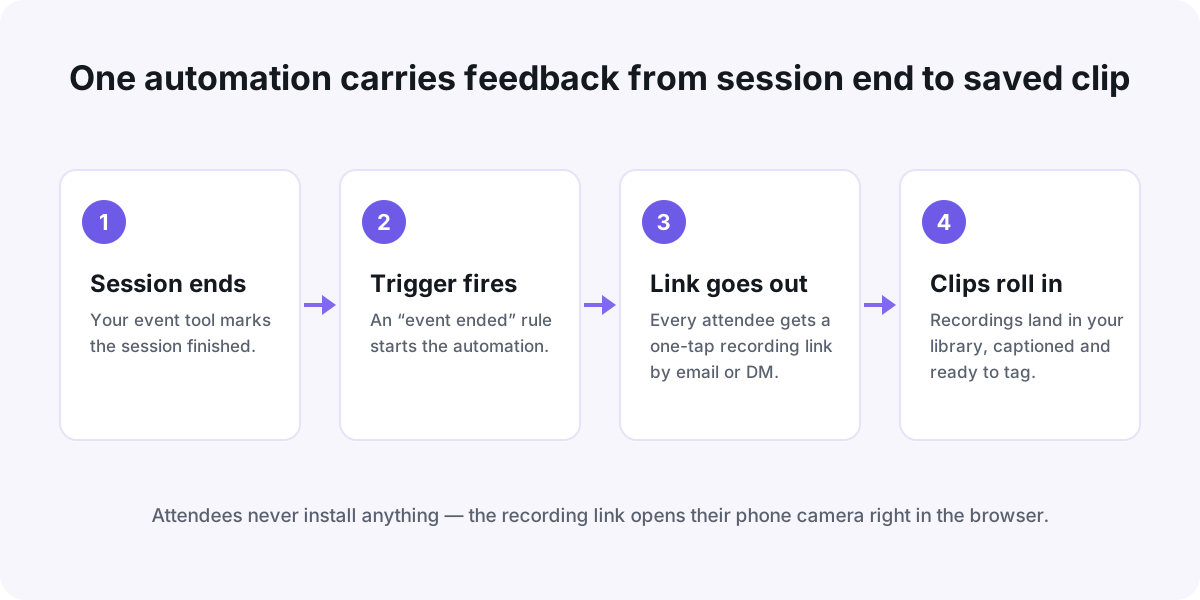
Set it up in about 20 minutes
- Create your recording form. Keep it to two or three questions. Good ones: "What made you show up today?", "What's one thing you're taking away?", "Who should come to the next one?" For more prompt ideas, these questions that get people talking on camera adapt easily from podcasts to events.
- Copy the form link. That single URL is the whole payload — it works in an email, a DM, or a community post.
- Pick your trigger. In your event tool or automation tool, look for "event ended" or "meeting ended." That's the moment your message should send.
- Add the action. Send an email or DM to everyone who actually attended — not everyone who registered. No-shows deserve a different message, or none at all.
- Test it on yourself. Create a dummy event, invite yourself, end it, and watch your phone. Tap the link and record a test clip start to finish.
No "event ended" trigger? Use the clock
Plenty of tools only know when an event starts. In that case, schedule the send for the published end time plus ten minutes. It's less precise, but the message still lands while people are closing their tabs — which is what matters.
Write a message worth tapping
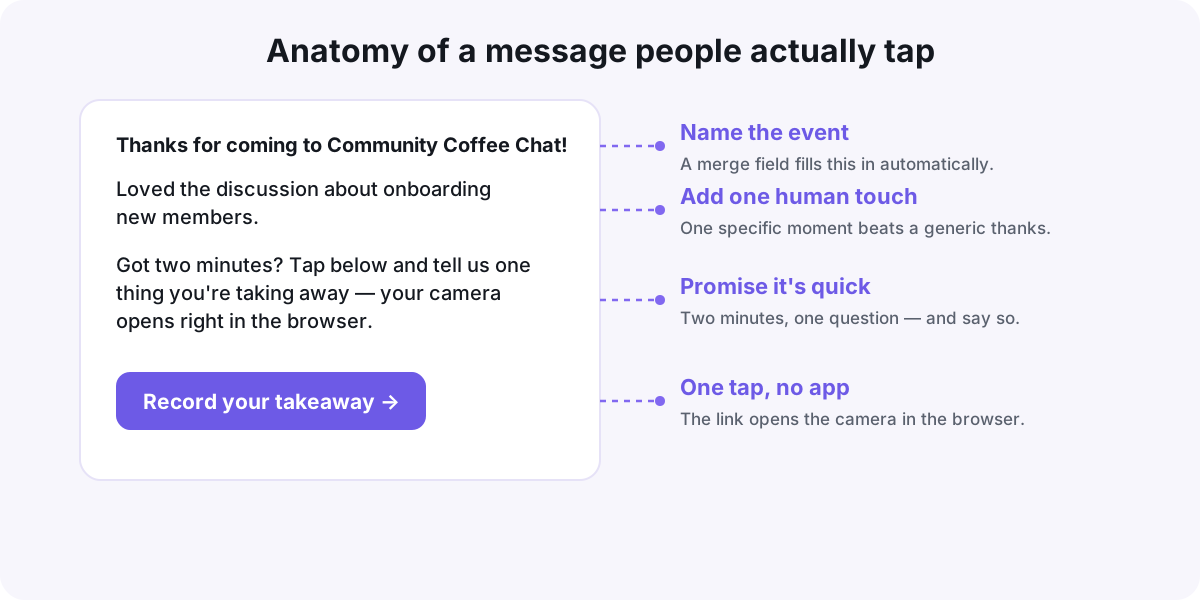
Automation delivers the message; the wording earns the tap. Keep it short, name the event, and promise it's quick:
Thanks for coming to [event name] today! Loved the discussion about onboarding new members. Got two minutes? Tap below and tell us one thing you're taking away — your camera opens right in the browser, nothing to install.
Use your tool's merge fields for the event name, so every send feels personal without any editing. And if you want to go deeper on the wording of the ask itself, here's a full guide on how to ask for a video testimonial.
What to do with the clips
The recordings arrive in your library already captioned, which makes them easy to skim without headphones. Three habits worth building from day one:
- Tag by event and date. "may-meetup," "ama-june" — whatever matches how you think. A simple tagging system for your testimonial library means the perfect clip for any page is a ten-second search, even a year from now.
- Share highlights back. Post one or two clips in the community the next day. People love seeing themselves featured, and it quietly teaches everyone that recording is normal here.
- Build a wall for your event page. A rotating set of attendee clips on your registration page answers "is this worth my time?" better than any description you could write.
Your pre-event checklist
Run through this once before your next session:
- Recording form is live, with two or three questions max
- Automation is on: trigger = event ended, action = send the message
- Message names the event (merge field) and promises "two minutes"
- You've tested the whole flow on your own phone this week
- You know what tag the clips will get when they land
Set it up once, and every event you host from now on quietly builds a library of real voices — while you're still stacking chairs.
Put your customers on camera
Collect, caption, and embed video testimonials with Wovestory — see it on your own testimonials in a 20-minute call.