Tag, sort, and find the perfect reader quote in seconds
Somewhere in your inbox is the perfect reader quote for the page you're building tonight. Here's a four-tag system that means you never have to scroll for it again.
Every newsletter writer has a pile like this: kind replies buried in the inbox, screenshots of nice posts, a survey tab from last year, maybe a video clip a reader recorded on their phone. The praise exists. Finding the right piece of it at the right moment is the hard part.
The fix isn't more effort — it's a tiny bit of structure. Tag each quote once, when it arrives, and every future search takes seconds.
Why "I'll remember where it is" stops working
With ten quotes, memory works fine. Around thirty, it quietly fails — and it fails in a specific way: you stop reaching for the best quote and start reaching for the most recent one, because that's the one you can find.
That's a real cost. Your signup page deserves the quote about how your newsletter changed someone's Sunday morning, not whichever reply happened to arrive last week. A sponsor deck deserves the quote about readers actually clicking, not a generic "great issue!"
If your praise is scattered, gather it into one place first. Posts and reviews from other platforms can be imported into a single library, and if the kind words are still sitting in your inbox, start with our guide to turning reader replies into subscriber-winning social proof.
The four tags every quote needs
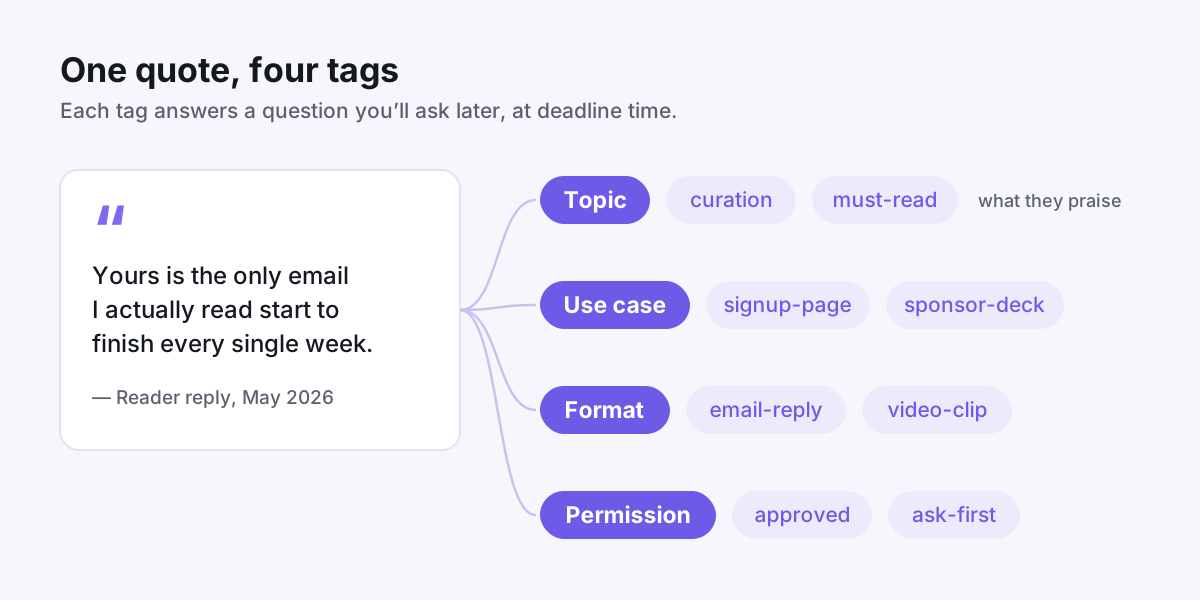
You don't need a complicated taxonomy. Four small tag groups answer every question you'll ask later:
- Topic — what the reader is praising. Examples: curation, actionable, must-read, saves-time.
- Use case — where you'd put it. Examples: signup-page, sponsor-deck, launch-email, about-page.
- Format — what kind of asset it is. Examples: email-reply, video-clip, social-post, survey-answer.
- Permission — whether you can publish it. Examples: approved, ask-first, anonymous-only.
Keep each group under about eight options. The moment you notice a tag you've only used once, merge it into a broader one. A short list you actually use beats a beautiful one you don't.
Tag one quote, start to finish
Say this lands in your inbox on a Tuesday: "I've unsubscribed from almost everything else. Yours is the one email I actually read start to finish every week."
Here's the twenty-second version of filing it properly:
- Topic: must-read — the reader is praising the habit, not any single issue.
- Use case: signup-page — "I read it every week" is exactly what a hesitant subscriber needs to hear.
- Format: email-reply.
- Permission: ask-first — until they say yes, it stays out of anything public.
One rule makes the whole system work: tag on arrival. A quote that goes into the library untagged is a quote you'll be hunting for in six months.
Build shortlists for the requests you get most
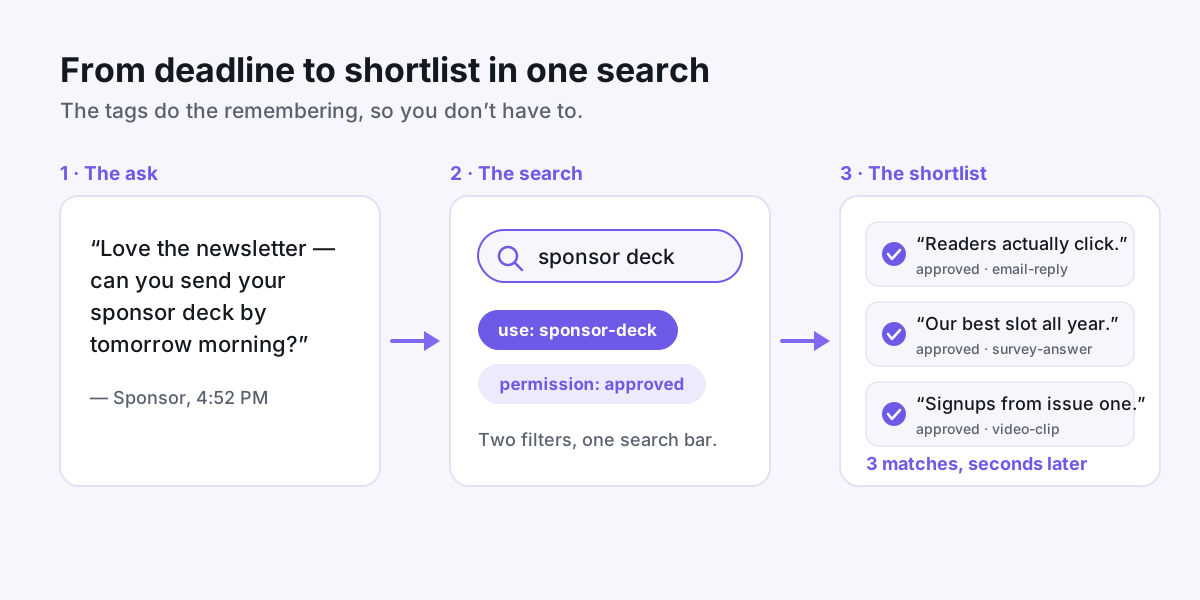
Tags earn their keep the moment a deadline shows up. A sponsor emails at 4:52 PM asking for your deck by morning? Filter use case: sponsor-deck plus permission: approved, and you're choosing between good options instead of digging through your inbox.
Go one step further and save a search for each recurring job:
- Signup page contenders — quotes about the reading habit and what readers get out of each issue.
- Sponsor deck — anything about clicks, replies, or the quality of your audience.
- Launch week — quotes about results, for the days you're actually selling something.
Review each shortlist a couple of times a year and swap in stronger quotes as they arrive. If you sell a course alongside your newsletter, the same shortlists feed directly into where to embed testimonials on a course sales page.
A five-minute weekly habit
The system stays useful only if the library stays current. Once a week, ideally right after an issue goes out:
- Sweep new replies, DMs, and survey answers into the library.
- Give each new quote its four tags — about twenty seconds apiece.
- Send a quick permission request for anything tagged ask-first that you'd like to publish.
- Retire quotes that mention things your newsletter no longer does.
While you're at it, notice which readers wrote the warmest replies. They're the people most likely to say yes if you ask for a video testimonial — and a few video clips filed alongside your text quotes, tagged the same way, are ready to drop into any page the moment you need them.
None of this takes real time. It just moves a little effort from the panicked night before a deadline to twenty seconds when a quote arrives — and that trade is the whole trick.
Put your customers on camera
Collect, caption, and embed video testimonials with Wovestory — see it on your own testimonials in a 20-minute call.