Turning reader replies into subscriber-winning social proof
Somewhere in your inbox there's a reply that explains, better than you ever could, why someone should subscribe. This guide walks through saving those replies, getting permission to quote them, and putting them to work on your signup page.
Why replies make unusually good testimonials
When you ask someone for a testimonial, they write what they think a testimonial should sound like — polite, vague, forgettable. When a reader hits reply at 7 a.m. to tell you an issue changed how they price their work, they write like a human. That unpolished, specific voice is exactly what convinces a stranger hovering over your signup form.
Replies also carry details you could never script: which issue, which section, what actually changed for them. Specifics persuade. Adjectives don't.
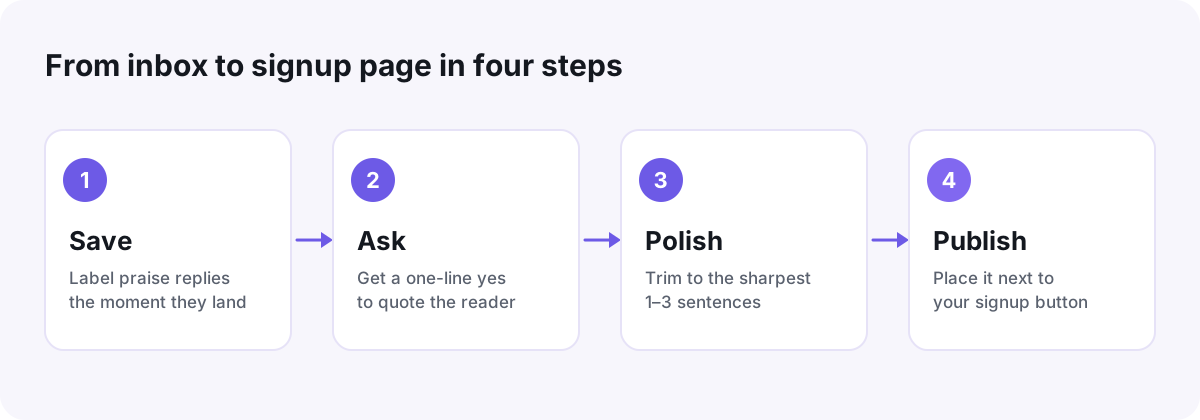
Start a praise folder — ten minutes, today
The main reason kind replies never become social proof is that nobody can find them three months later. Fix the storage problem first:
- Create a label or folder called Praise in your email app.
- Search your archive for replies to your last ten issues and move the warm ones in.
- From now on, file every new praise reply the moment it lands. It takes five seconds.
- Screenshot kind tweets, DMs, and community comments into the same place — they count too.
Once the folder passes a dozen entries, a flat pile stops working. A simple tagging system for your testimonial library — tag each quote by topic, by who wrote it, and by where you've already used it — keeps the right one findable in seconds.
Ask permission with one short email
Never publish a private email without asking. It's their writing, sent to your inbox in confidence, and one awkward surprise can cost you a loyal reader. The good news: asking is easy, and most people are genuinely flattered.
Here's wording you can copy:
Hi [name] — thank you again for this note, it made my week. Could I quote a couple of lines from it on my signup page? I'd credit you as "[first name], [what you do]" — or keep it anonymous if you'd rather. Totally fine to say no!
Offer the anonymous option every time. Readers who replied from a work address often say yes only once they know their employer's name won't be attached.
Polish without putting words in their mouth
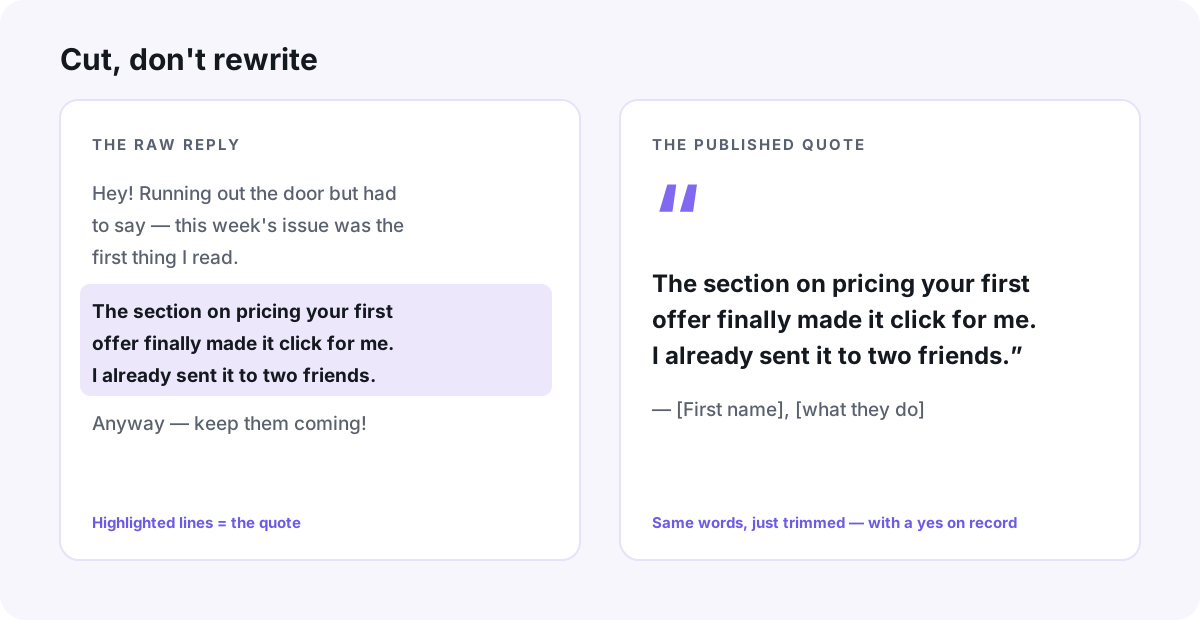
Editing a testimonial works like editing a quote in journalism: you can cut, you can't add.
- Trim to the one to three sentences that carry the point.
- Fix obvious typos quietly — your reader will thank you.
- Use square brackets for missing context: "that issue [on pricing] finally made it click."
- Never upgrade their adjectives. "Useful" does not become "life-changing."
- If you changed anything beyond trims and typos, send them the final version before it goes live.
Put quotes where the subscribe decision happens
A great quote sitting in a folder converts nobody. Three placements do most of the work:
- Next to the signup button. One or two lines directly under the form beats a wall of praise buried further down the page.
- In the welcome email. A quote from a longtime reader reassures new subscribers they made a good call — right when unsubscribing is easiest.
- On your about or landing page, where curious readers go to decide if you're worth their inbox.
Two or three quotes you rotate every quarter beat twenty static ones. Fresh specifics — a recent issue, a current topic — signal that people still love the newsletter now, not just when you launched.
When a reply earns an upgrade to video
Every so often a reply is so good it deserves more than a pull-quote. That's the moment to ask the reader for a 60-second video version — the same story, told to camera. A face and a voice make skeptical visitors trust the words in a way text alone can't.
The ask is its own skill, and we've written a full guide on how to ask for a video testimonial without making it awkward. The short version: make recording one tap, hand them a single question to answer, and promise they can redo it.
Collect a handful of clips and they can live together on your signup page as a wall of proof. For a look at what that does in practice, read how a course creator doubled enrollments with a Wall of Love — a different audience, but the same mechanics a newsletter can borrow.
Don't wait until you've built the perfect system. Make the folder, move three replies into it, and send one permission email today. Next time you touch your signup page, the proof will be waiting.
Put your customers on camera
Collect, caption, and embed video testimonials with Wovestory — see it on your own testimonials in a 20-minute call.