How a podcast grew its audience with listener video clips
Picture a weekly interview podcast with a devoted audience and flat download numbers. Here's how a show like that can turn listener video testimonials into its best-performing social content — the ask, the editing, and the posting cadence, step by step.
The show everyone loves but nobody new can find
Here's the setup, and it will feel familiar to a lot of podcasters. Two hosts, a hundred-plus episodes, kind reviews on every podcast app, and listeners who quote the show back to them in emails. Growth, though, has been flat for a year.
The problem isn't the show. It's that audio is nearly impossible to share. A five-star review sits inside an app where only existing listeners ever see it, and episode announcement graphics get a polite handful of likes from people who already subscribe.
What this kind of show has — and usually doesn't use — is proof. Real people whose commutes, careers, or opinions the show has changed. The whole play below is about getting that proof on camera and putting it where strangers scroll.
The ask: one line in the outro, one link in the show notes
Instead of asking for reviews, the hosts start asking for a short video. They set up a Wovestory recording link — one tap on a phone, no app, no signup — and put it in two places: the episode outro and the show notes.
The outro line stays the same every week, something like: "If this show has ever changed how you think about something, tell us about it on camera. The link's in the show notes — it takes about a minute." A standing ask beats a one-off campaign because every new listener eventually hears it.
Two details make the difference between crickets and a steady trickle of recordings. First, the wording of the ask itself — we've broken down the timing and phrasing that works in our guide to asking for video testimonials. Second, the prompts listeners see when they open the link. "Say something nice about us" produces vague praise; specific prompts produce stories. We keep a list of questions that get podcast listeners talking on camera, but even one good prompt like "Which episode do you bring up in conversation, and why?" will do.
From raw recording to a clip worth sharing
Recordings arrive as 60–90 second videos, and most of that footage is warm-up. The job is to find the 20–30 seconds where the listener says something specific — names an episode, describes a change, laughs at their own obsession with the show — and cut everything else.
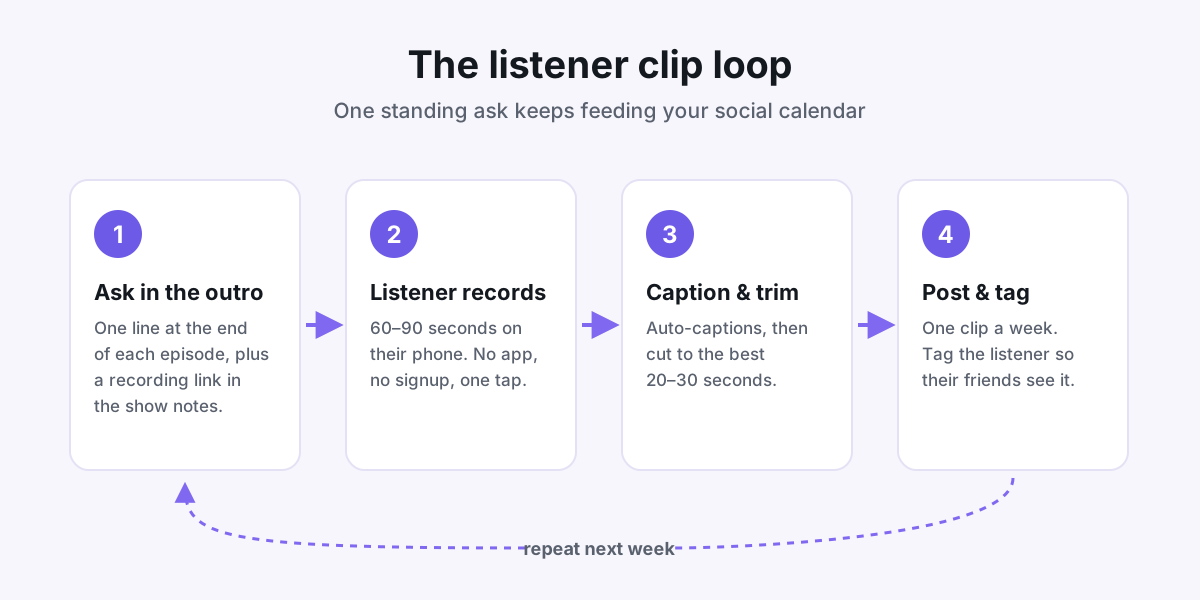
Captions are non-negotiable. Most social feeds autoplay muted, so a clip without captions is a silent face. Wovestory auto-captions every recording as it comes in, which turns editing into a five-minute job: read the transcript, pick the best lines, trim to match.
Finish each clip with a simple end card — show name, where to listen. Keep it to two seconds. The listener's face is the content; the end card is just directions.
A posting cadence you can actually keep
The mistake is posting five clips in launch week and then going quiet. The version that works is boring: one listener clip a week, same day every week, forever.
Each post follows a small checklist:
- Get permission first. The recording form already asks, but confirm before tagging anyone.
- Tag the listener. Their friends and followers are exactly the kind of people likely to enjoy the same show — and most listeners happily reshare a post that features them.
- Write one line of context, not a paragraph. "A listener on why episode 84 lives rent-free in their head" is plenty.
- Link the episode they mention, not just the show. Curious strangers need a specific first step.
Why do these outperform announcement graphics? Because a real face saying something specific is social proof, and artwork is an ad. Podcasters who run this loop often find listener clips become their most-shared posts within a month or two — and every reshare puts the show in front of a feed it had no other way to reach.
One clip, three jobs
Social is only the first use. Each clip in the library can work in two more places without any extra editing.
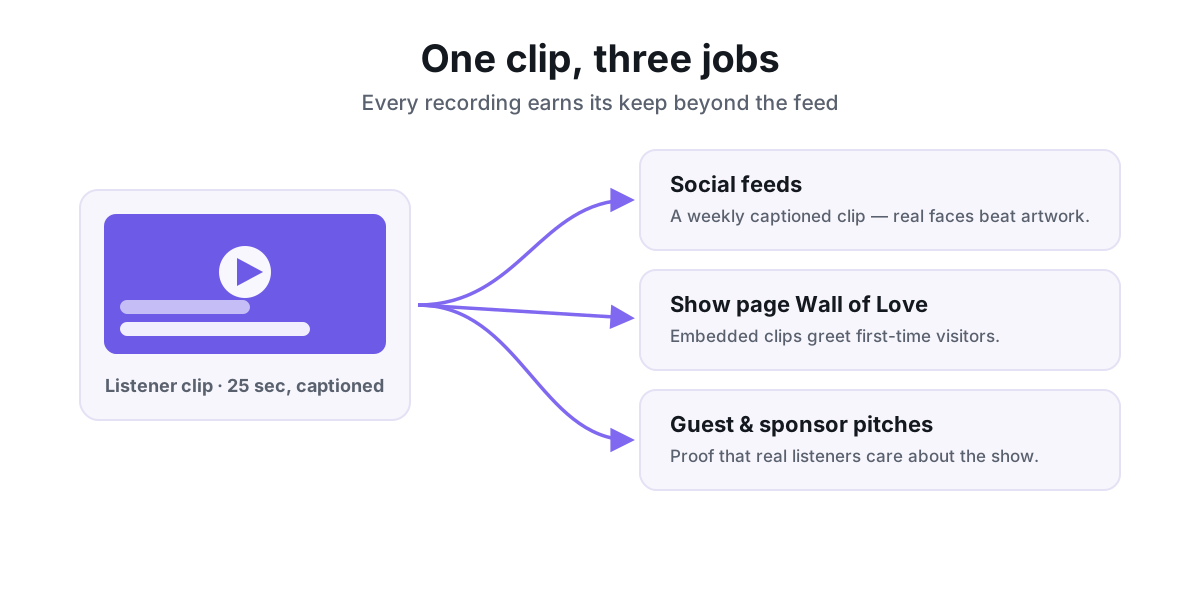
Second job: the show's website. A Wall of Love — a grid of embedded listener clips — gives first-time visitors something no episode list can: real people vouching for the show before anyone presses play. It's the same move that worked in our story about how a course creator doubled enrollments with a Wall of Love, just pointed at listeners instead of students.
Third job: pitches. When the hosts email a dream guest or a potential sponsor, three listener clips attached to the pitch say "our audience is real and engaged" better than any download chart. You can also pull in the written praise you already have — Wovestory imports reviews and mentions from 30+ platforms — so the wall mixes video clips with your best app-store reviews.
Start this week
Honest expectations: the first ask usually brings in a small handful of recordings, not a flood. The trickle grows once clips start appearing in the feed, because listeners can suddenly see what they're being asked to make. Give the loop a couple of months before judging it.
Here's the whole setup, doable in an afternoon:
- Create a recording link with two or three specific prompts.
- Write one outro line and record it into your episode template.
- Add the link to your show notes template so it ships with every episode.
- Put a weekly reminder in your calendar: caption, trim, post, tag.
- Once you have five clips, embed a Wall of Love on your show page.
That's the entire machine. No ad budget, no clip editor on retainer — just a standing ask and a loop you can run in under an hour a week.
Put your customers on camera
Collect, caption, and embed video testimonials with Wovestory — see it on your own testimonials in a 20-minute call.